
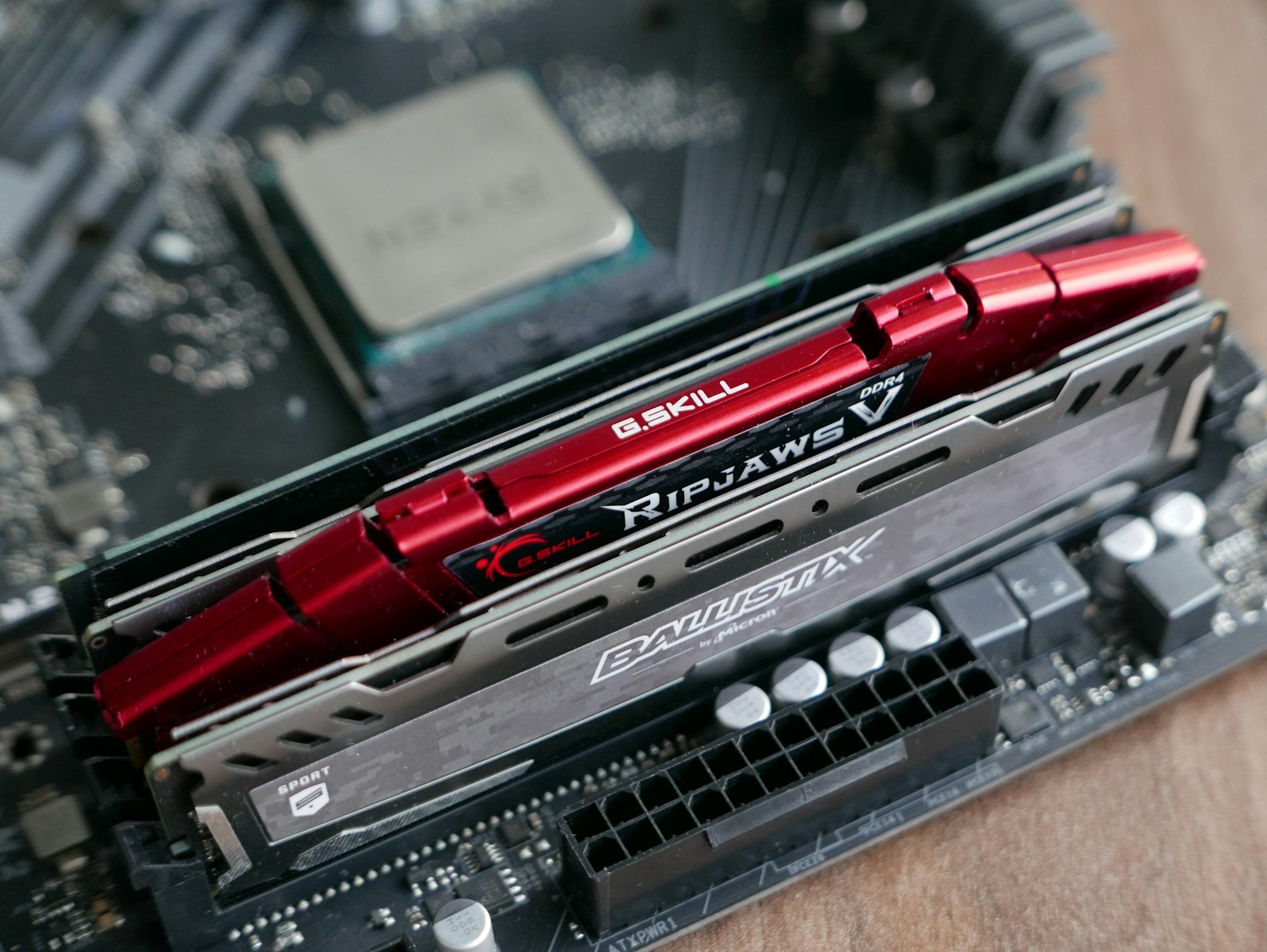
“Buy it before the price goes up” is not a strategy. Late-2026 DRAM and flash research shows real supply pressure from AI infrastructure, but consumer memory and enterprise storage are not moving in lockstep. Before spending more on RAM or an SSD, determine what your system can use, how much capacity actually changes your workload, and whether the advertised deal is better than the price you have already tracked.
What readers should know
- TrendForce projects continued fourth-quarter 2026 DRAM and NAND contract-price pressure, with some enterprise SSD segments rising more sharply than consumer categories.
- DDR4, DDR5, laptop soldered memory, SATA SSDs and M.2 NVMe drives are not interchangeable. Compatibility comes before discounts.
- A price forecast is not a guarantee about an individual retail kit or drive. Compare the exact model, warranty and historical street price.
What the market data says—and does not say
TrendForce’s September outlook describes cloud-service-provider demand as a driver of fourth-quarter DRAM and NAND increases. Manufacturers have increasingly prioritized server DRAM and high-bandwidth memory, while enterprise QLC SSDs benefit from AI data workloads. These are demand and supply dynamics across product segments, not a schedule for every retail-store sticker.
Its late-October specialty DRAM report also says consumer market demand is weak enough to limit some price gains, even while supply remains tight. Spot prices can fall while long-term contract prices rise. Anyone promising that all RAM and SSD products will increase by the same percentage is oversimplifying the data.
Decide whether to buy now with a four-question test
First, is the upgrade necessary within 90 days? A failing drive, production deadline, limited upgrade window or software requirement may justify purchasing at a known acceptable price. A purely speculative spare kit may not.
Second, confirm the motherboard model, BIOS support, socket, memory generation, slot count, module type and supported capacity. Desktop DDR5 will not fit a DDR4 board; many ultrabooks have permanently soldered memory. Third, measure utilization. Fourth, identify an acceptable total price—including sales tax, shipping, and any adapter or installation cost.
RAM: quantity often beats a headline speed
For many Windows 11 PCs, moving from 16GB to 32GB may do more for actual responsiveness than paying a premium for a faster kit when the system already has enough capacity. Rendering, virtual machines and professional content workflows have different requirements; no single capacity is perfect for everyone.
Use a supported two-DIMM configuration where practical and consider qualified-vendor-list guidance for stability. XMP or EXPO is an overclocked memory profile, not a guarantee. If a PC already exhibits crashes or memory-test errors, do not add expensive RAM as a substitute for diagnostics.
Storage: performance, endurance and fit matter
An M.2 connector does not necessarily mean NVMe support. Check whether the slot accepts SATA or PCIe NVMe, supported keying, drive length and thermal limits. Compare capacity, warranty and endurance before chasing peak sequential benchmarks.
If a new drive is for backup, verify that your recovery process works independently of the original machine. For a boot-drive upgrade, make a tested backup before cloning and confirm any BitLocker recovery key. Retail SSD performance and enterprise cloud SSD pricing do not always move together.
A practical price-watch workflow
Save the exact part number, not just “32GB DDR5” or “2TB SSD.” Track at least two trusted sellers, verify whether pricing is for a kit or a single module, and compare genuine warranties and seller return policies. Set a maximum price rather than watching a percentage-off banner.
If a must-have purchase is due soon, buy when a verified compatible part hits the budget. If the upgrade is optional, wait for a known sale window. Avoid opening sealed components just to check them when doing so could hurt return rights; verify compatibility from documentation first.
What SJK would not recommend
Do not borrow money to hoard consumer PC parts based on dramatic social-media forecasts. Do not mix memory generations, disable security features to force unsupported upgrades, or choose a used enterprise SSD without checking wear and health data.
The best defense against volatility is a planned bill of materials, a measurable bottleneck and a fallback option. Our longer RAMpocalypse guide covers twelve additional ways to save on the rest of a PC build.
Editorial method: Current findings are attributed to the sources below. A preliminary explanation is not a final investigative conclusion; projections, allegations and buying advice are explicitly distinguished from established events.
Sources & further reading
Reporting as of November 15, 2026. Source statements, industry forecasts and independent analysis are distinguished in the article. Photo credits are below.
Photograph: SJK archival hardware photograph, illustrative. Original photograph, attribution and reuse terms. Actual desktop RAM photographed on a motherboard; illustrative DDR4 hardware, not an advertised DDR5 price or specific current product.
 CHIPS / TAIWANTaiwan Is Building More DRAM. That Won’t Fix Memory Prices Overnight.
 GAMING / NVIDIAWhat NVIDIA’s Shakeup Means for Gamers
 INFRASTRUCTURE / AVIATIONWhat Really Shut Down U.S. Flights: The FAA’s November 13 Network Failure